
Speech Recognition & Synthesis
Screenshots
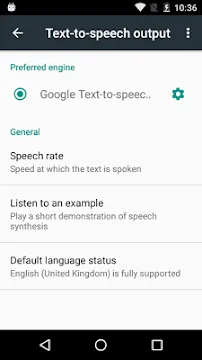
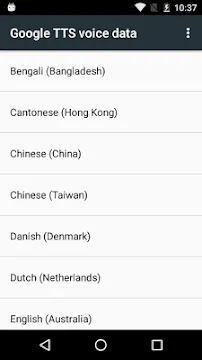
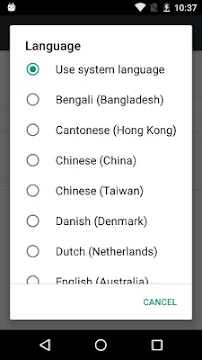

Speech Recognition & Synthesis from Google transforms how you interact with your mobile device. This foundational tool allows your system to understand spoken words and read aloud text from your screen. It functions silently in the background of your favorite tools to translate voice into written data. Then, it reverses the process to turn written sentences into smooth audio. It plays a massive role in improving accessibility and daily productivity.
Many popular tools rely entirely on this engine to perform core daily functions. For instance, translation tools use it to read foreign words with the exact right accent. Navigational tools listen to your voice commands while you drive to keep you safe. Accessibility tools also use it to read entire screens for visually impaired individuals. Understanding its deep benefits can change your entire mobile experience.
What is Speech Recognition & Synthesis from Google?
Speech Recognition & Synthesis from Google is the built-in engine that powers voice interactions on your device. It consists of two main smart engines that work together seamlessly. The first engine acts as a listener by turning your spoken voice into text. The second engine works as a speaker by reading written text out loud. Together, they form the backbone of voice communication on your system.
This technology does not require you to open a separate screen to make it work. Instead, it integrates directly into your operating system options. Other utilities on your device simply request assistance from this engine when they need to process voice data. It operates smoothly across a massive variety of global languages and local dialects.
How to Set Up The App
You can easily configure Speech Recognition & Synthesis from Google through your default device system settings. First, unlock your mobile device and open the main system Settings menu. Then, scroll down until you locate the system Languages or Accessibility section. Inside this menu, you will find the specific options for your preferred voice input and audio output.
- Open your main device Settings.
- Select the Accessibility or Languages option.
- Tap on Preferred Engine or Voice Input.
- Choose Speech Recognition & Synthesis from Google as your default provider.
- Tap the play button to listen to a quick audio test.
Once selected, you can adjust the speed of the spoken voice to match your preference. You can also change the pitch of the audio to make it sound more comfortable.
Key Benefits of Speech Recognition & Synthesis from Google
The advanced architecture of Speech Recognition & Synthesis from Google provides major advantages for daily task management. First, it saves massive amounts of time during message composition. You can simply speak to dictate long emails or chat texts without touching your keyboard. This hands-free operation makes multitasking incredibly simple and highly efficient.
Second, it enhances learning by helping you master the correct pronunciation of complex foreign words. Language learners use it to check how their spoken phrases sound compared to native speech. Furthermore, it allows book enthusiasts to listen to their favorite literature while walking or cooking. It truly changes static written content into dynamic audio experiences.
Language Support in Speech Recognition & Synthesis from Google
Global communication requires excellent language variety, and Speech Recognition & Synthesis from Google delivers exactly that. The engine supports dozens of international languages and precise regional accents. For example, you can select between distinct variations of English, such as Australian, British, or American. This ensures the system understands your exact regional tone.
- High-quality audio files download directly to your local storage space.
- The system bundles regional voice packages together to save valuable space.
- Regular background updates add support for less common regional dialects.
- Offline mode allows basic speech functions to continue without internet data.
Because it downloads these packages locally, your device can process many voice tasks offline. This feature keeps your essential voice tools functional even when you lose your cellular connection.
Customizing Speech Recognition & Synthesis from Google Settings
You can fully personalize Speech Recognition & Synthesis from Google to match your daily acoustic environment. If you work in a noisy room, you can adjust the input sensitivity to focus better. You can also choose between different voice profiles, including male, female, or neutral tones. These custom changes help create a highly personalized conversational flow.
To optimize the output volume, you can use the built-in audio gain controls. These settings can boost the output sound by several decibels if you struggle to hear clearly. Conversely, you can slow down the playback speed if the default reading voice sounds too fast. Taking a few minutes to adjust these settings ensures maximum clarity.
Troubleshooting Speech Recognition & Synthesis from Google Issues
Sometimes Speech Recognition & Synthesis from Google might experience small performance drops or text mistakes. If the voice typing stops working, you should first check your active microphone permissions. Frequently, another utility might block access to the audio hardware. Clearing the system cache files can also resolve sudden freezing issues.
- Navigate to your system Apps list.
- Select Speech Recognition & Synthesis from Google from the list.
- Tap on Permissions and ensure Microphone access is enabled.
- Select Storage and tap on Clear Cache to refresh the files.
- Restart your device to apply all the system changes cleanly.
If accuracy remains poor, you may need to download the voice package again. A fresh file download ensures the engine uses the latest vocabulary models for your language.
Conclusion
Speech Recognition & Synthesis from Google remains an essential tool for modern device operation. It bridges the gap between human speech and machine understanding with incredible precision. By converting your voice to text and reading screens aloud, it makes technology accessible to everyone. Spend some time adjusting its settings to experience the full power of hands-free mobile interaction.







